No — Google Maps in Korea still misses real-time transit and walking directions in 2026; install Naver Map (or KakaoMap) for directions and Papago for menus.
That gap is the same answer English-language Korea guides give this year, and it is why visitors get lost the first evening.
This post draws the line between what Google Maps can and cannot do in Korea, then gives you the app combo and each app’s job.
Does Google Maps work in Korea? What fails and what still works
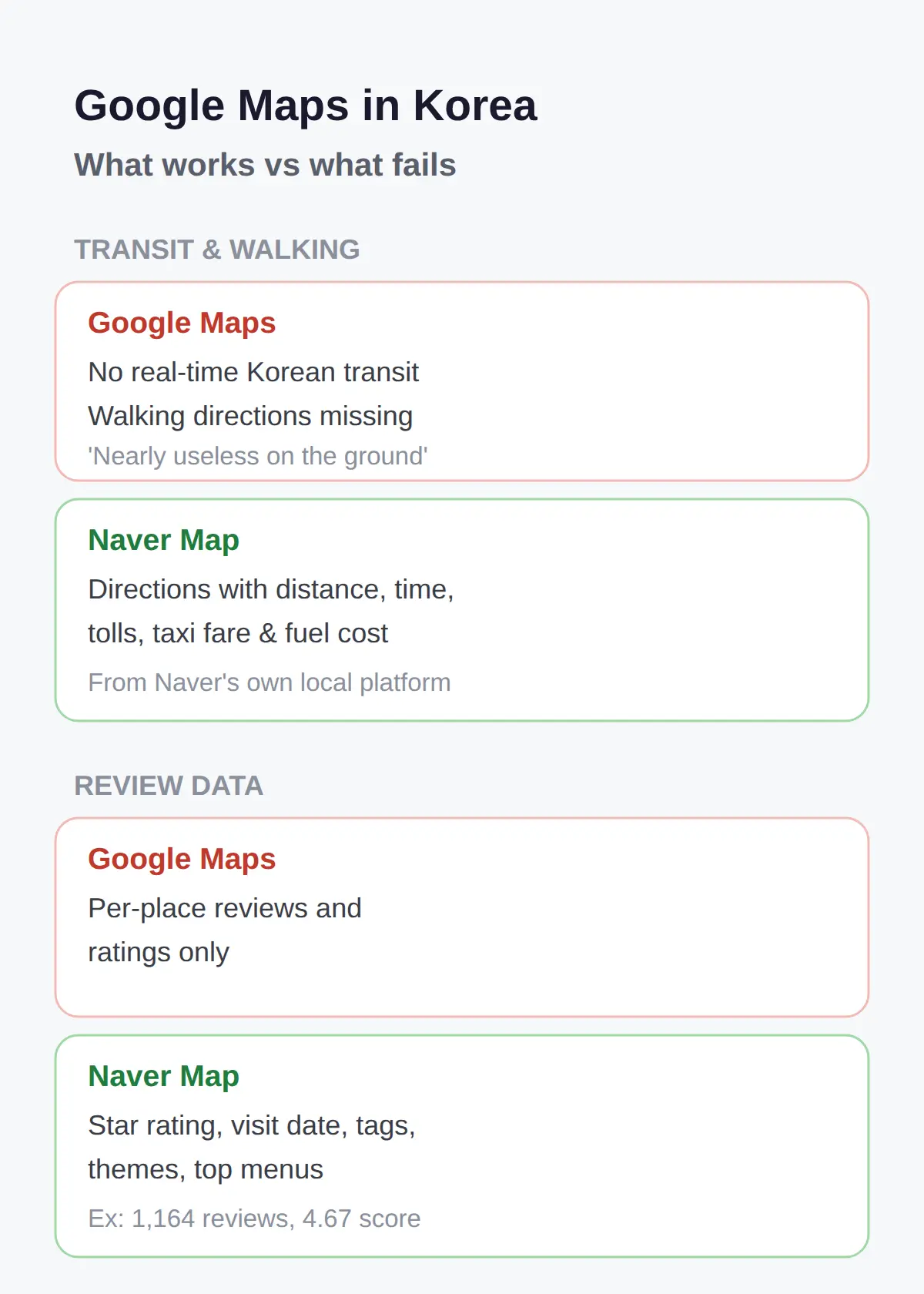
Google Maps in Korea works for basic orientation and business search, but it lacks real-time public transit information and walking directions.
English-language Korea travel guides in 2026 give the same verdict repeatedly, and one of them calls the app ‘nearly useless on the ground.’
So the split is simple.
Finding that a cafe exists, seeing its photos and reviews — that works.
Getting from your hotel to that cafe by subway, or walking the last 500 meters — that is where it stops.
When judging a Korea map app, the one thing worth checking first is whether it shows real-time transit and walking directions inside Korea.
Everything else is secondary, because those two are what you use standing on a street corner.
| Subway or bus directions in real time | Not available |
|---|---|
| Walking directions | Missing — guides call it nearly useless on the ground |
| Searching a business (photos, reviews, access info) | Works |
| Menus with prices on a place page | Not exposed — Naver Map carries them |
| Response languages for search | Naver Map: Korean, English, Japanese, Chinese |
Best Korea travel apps 2026: what to download
Download three apps before your flight: Naver Map (or KakaoMap) for directions, Papago for menus, and an eSIM for data.
English-language guides pair these together so consistently that the combo is effectively the standard Korea setup in 2026.
Papago handles Korean menus through its camera-based translation, so you point the camera at the menu board instead of asking staff.
KakaoMap appears alongside Naver Map as the alternative navigation app in the same guides.
Guides also bundle an eSIM as an essential Korea item next to the app list, so the download order ends with data: map app, Papago, eSIM.
If advising a first-time visitor, the advice would be to install Naver Map and Papago before the flight.
Naver’s developer-level map APIs require Korean phone verification for account setup, which is why third-party guides and travel apps fill the gap for tourists.
What Naver Map shows that Google Maps does not
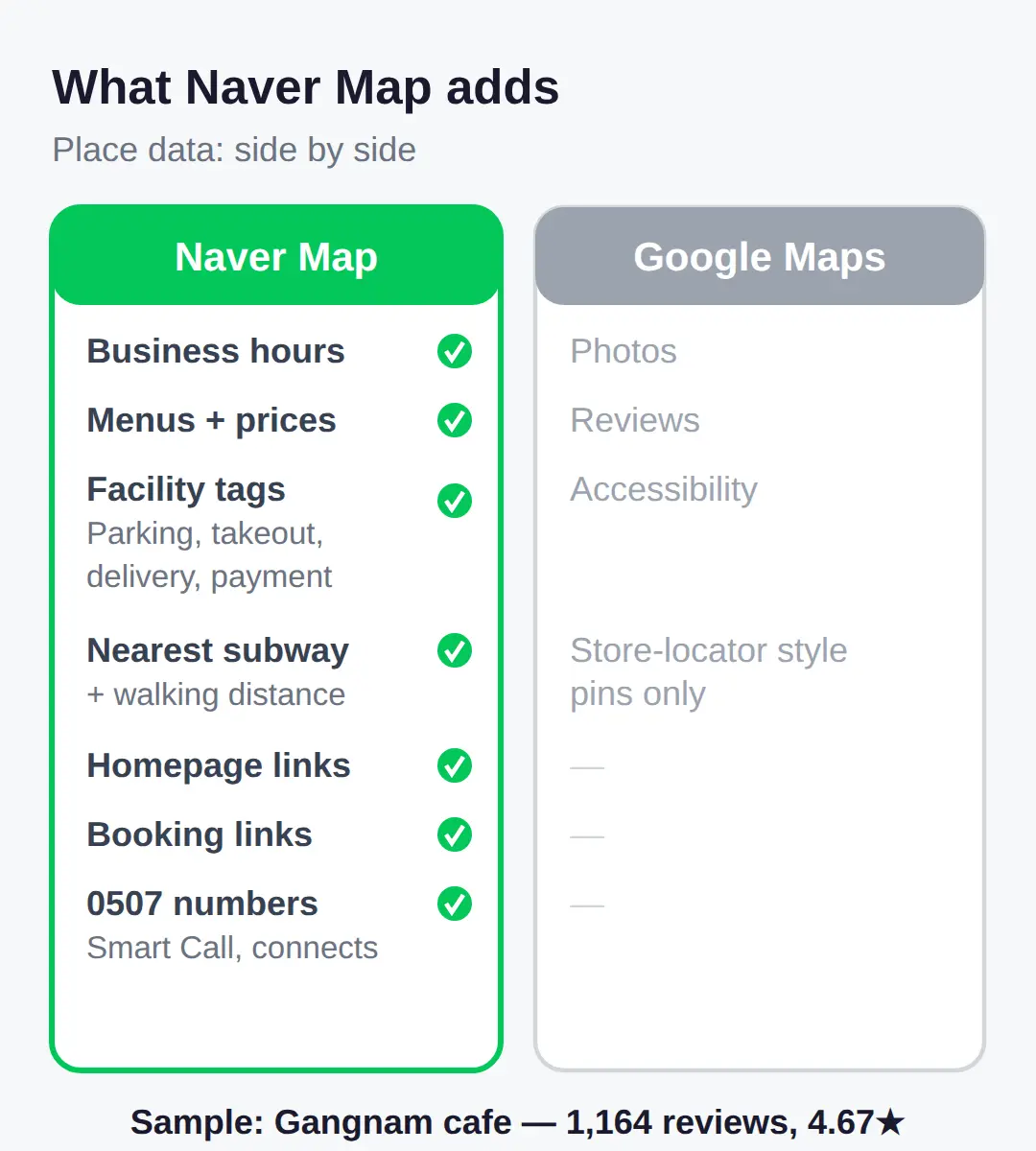
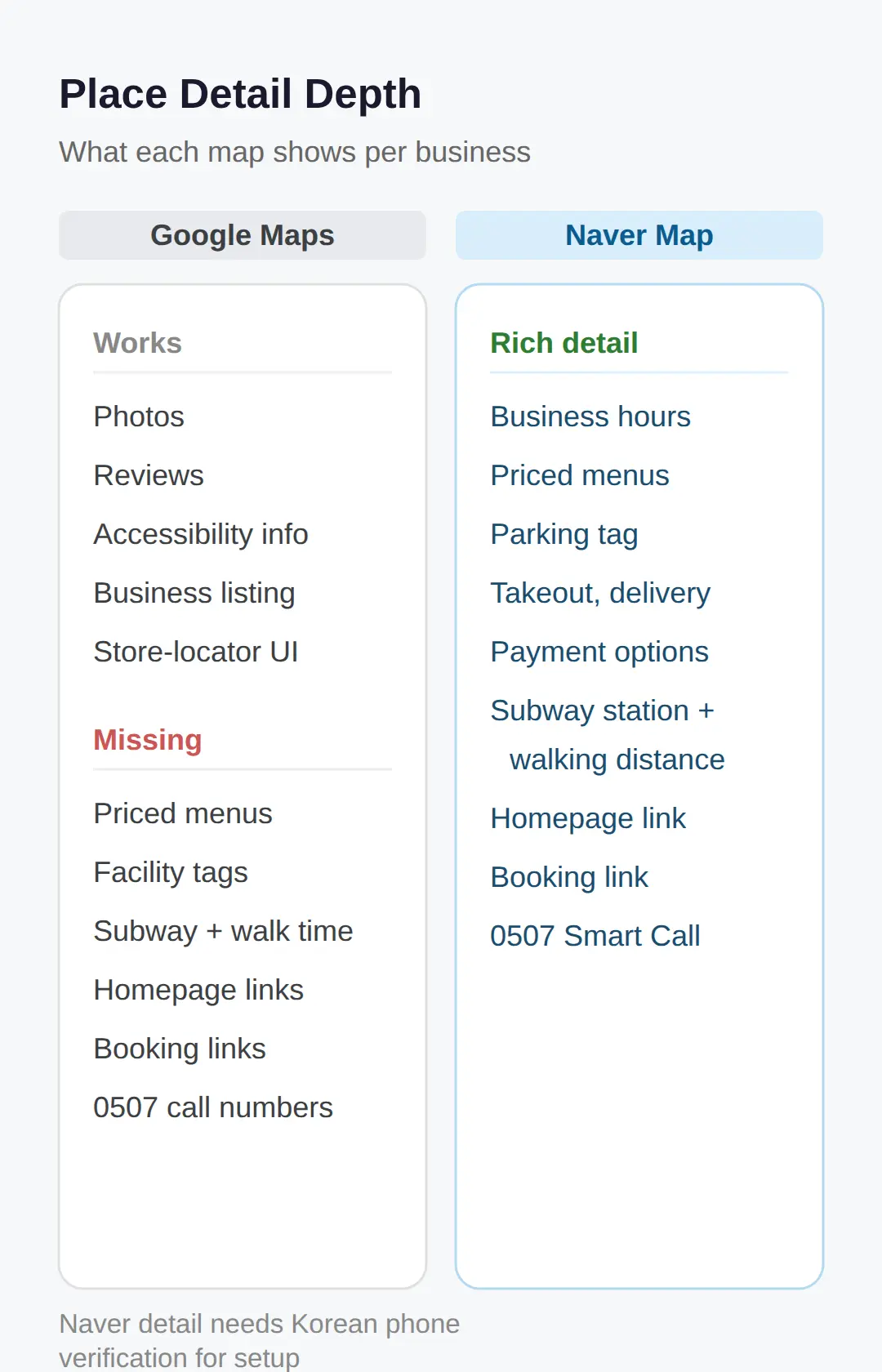
Naver Map place pages carry business hours, menus with prices, facility tags, review counts and scores, and the nearest subway station with walking distance.
Google Maps in Korea shows a store-locator style listing — map pins, photos, reviews, accessibility info — but its place data does not expose menu or price details.
A single Naver Map keyword search returns up to 100 places with phone, address, and review data; in one sample, a Gangnam cafe carried 1,164 visitor reviews at a 4.67 average score.
Place pages also list facility tags such as parking, takeout, delivery, and payment options, plus homepage and booking links.
Looking up a restaurant, cafe, or shop before you go — start with Naver Map, not Google Maps.
The listing numbers shown there are Naver Smart Call virtual numbers (0507), so the number on the page is the one that actually connects.
Directions and costs inside Naver Map
A Naver Map directions query returns distance, travel time, tolls, estimated taxi fare, and fuel cost between your origin and destination.
It also converts road-name and parcel addresses to coordinates and back to district addresses, so an address copied from a booking site is enough.
Visitors who need subway or bus directions in Seoul or anywhere else in Korea should use Naver Map for this reason: its transit data comes from Naver’s own local platform, not Google’s global feeds.
Search responses support Korean, English, Japanese, and Chinese, so Japanese- and Chinese-speaking travelers can use it natively.
If you still open Google Maps out of habit, keep it for basic orientation and business search only.
Getting around on the ground is what Naver Map or KakaoMap covers.
| What a directions query shows | Google Maps | Naver Map |
|---|---|---|
| Real-time transit | Not available for Korean transit | From Naver’s own local platform |
| Walking directions | Missing in Korea | Included |
| Cost preview | — | Tolls, estimated taxi fare, fuel cost |
Why Google’s global data is thin in Korea
Naver’s official map services require Korean phone verification for account setup, and the free usage limits are small enough that developers report hitting them quickly.
This may help explain the gap: projects needing Korean menu data have had to work through Naver Map pages, while Naver’s developer ecosystem notes Korean phone verification as a barrier to official API access.
The pattern repeats on the other side: Google’s place details do not expose restaurant or cafe menus with prices, so projects that needed that data in Korea had to pull it from Naver Map pages instead.
Korean-only information and complex interfaces on both apps are a recorded pain point for foreign visitors in a 2026 traveler-journey mapping project.
Whether Naver Map’s English interface covers full walking navigation as completely as the Korean one has not been confirmed on-device.
Checking the walking-directions tab right after installing, before you need it on the street, is the practical test.
English guides repeatedly pair Naver Map for navigation with Papago for translation, so installing both together covers the gap between them.
My first check on arrival is whether the walking-directions tab renders in English on Naver Map, since that is the feature Google Maps cannot replace.
Related posts
📎 📅 Upcoming Dates — Release & Event Calendar
Sources
- Already collected in prior pass (brief.md sources: koreabytr (koreabytrain.com)
- Papago camera menu translation repeatedly cited in 2026 Kore (visit-korea-guide.tistory.com)
- Naver Map described as Korea’s dominant map and local-search (apify.com)
Quick recap
- Test transit directions in a central area like Myeongdong on your first day — subway lines are where Google Maps gives up.
- Naver Map for directions, Papago for menus, eSIM for data — install all three before the flight.
- Naver Map search supports Korean, English, Japanese, and Chinese.
- Check whether walking directions work in your language right after installing, not on the street.
FAQ
Q. Does Google Maps work in Korea?
For basic orientation and business search, yes. For real-time transit and walking directions, no — that gap is confirmed across 2026 English-language Korea guides.
Q. What app should I use for directions in Korea?
Naver Map is the default; KakaoMap is the standard alternative named in the same 2026 guides, and Naver Map’s local data comes from Naver’s own Korean platform.
Q. What are the best Korea travel apps 2026?
Naver Map or KakaoMap for navigation, Papago for camera-based menu translation, and an eSIM — the combo English-language guides bundle consistently in 2026.
Q. Can I read Korean menus without Korean?
Yes, with Papago. It translates menus through the camera, and 2026 guides pair it with Naver Map as the standard app combo.
Q. Can I use Naver Map in English?
Naver Map search supports Korean, English, Japanese, and Chinese. Whether its English interface covers full walking navigation as completely as the Korean one has not been verified on-device.
Before your trip: install Naver Map and Papago at home, activate the eSIM on landing, and test one walking route near your hotel.
Cover photo: Social media applications mobile screen — CC0 1.0
#Koreatravelapps #NaverMap #GoogleMapsKorea #Papago #Koreatransit
📅Upcoming Schedule — this week 23 · D-1 Autumn season = post-summer brightening demand window (UV drSee all →