Double-click the iPhone’s side button, authenticate with Face ID, and hold the top of the phone near the reader until ‘Done’ appears — and since March 2026, new transit kiosks in Korea accept contactless credit card taps.
Contents
- How to Tap a Credit Card on iPhone in Korea, Step by Step
- Can I Tap a Credit Card on iPhone in Korea’s Subway?
- Is T-money Actually in Apple Wallet?
- Where Apple Pay Works in Korea — and When It Fails
- Why Your Card Number Stays Private
- If the Card Will Not Add or Will Not Read
How to Tap a Credit Card on iPhone in Korea, Step by Step
Add an eligible card to the Wallet app, then pay by double-clicking the side button and holding the top of the iPhone near the reader until ‘Done’ appears.
That is the whole tap-to-pay flow, and it works the same in Korea as anywhere Apple Pay is available.
To add the card, open Wallet, tap ‘Credit/Debit Card’, and either hold the iPhone near the card’s chip, choose ‘Enter Card Details Manually’, or scan the card with the camera.
Many banks also offer an ‘Add to Apple Wallet’ button inside their own apps.
At payment, a Face ID iPhone uses the side button and Face ID or passcode, while a Touch ID iPhone uses the Home button instead.
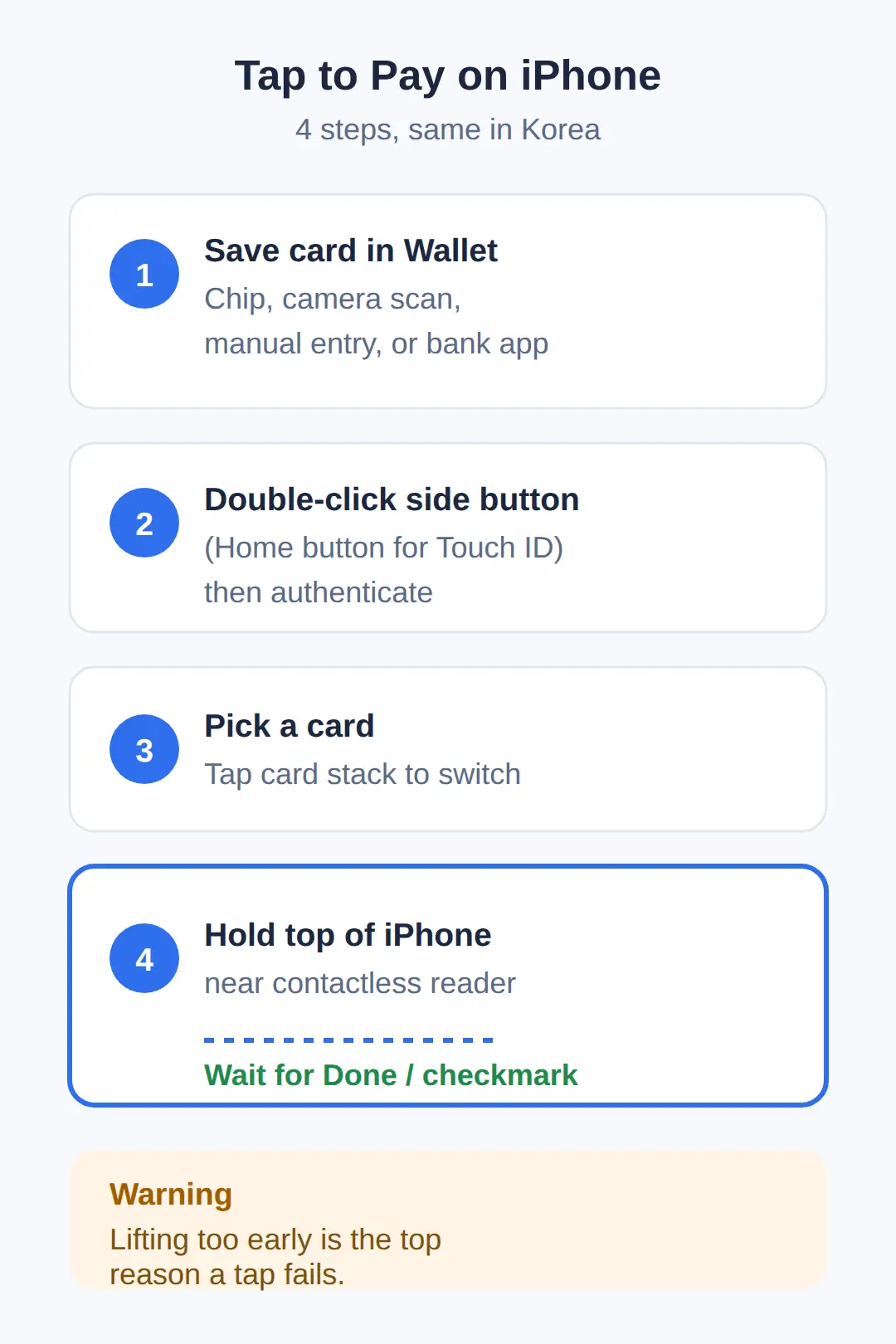
- Save your card in Wallet — by chip, manual entry, camera scan, or your bank’s app.
- Double-click the side button (Face ID) or Home button (Touch ID) and authenticate.
- To use a card other than the default, tap the card stack at the bottom of the screen and pick another one.
- Hold the top of the iPhone near the contactless symbol until ‘Done’ or a checkmark appears.
Keep the phone at the reader until you see that checkmark.
The payment is not finished at first contact, and lifting the phone too early is the most common reason a tap fails.
| You want to tap your iPhone to pay at a store or restaurant | Add an eligible card to Wallet first, then double-click the side button (Face ID) or Home button (Touch ID) and hold the top of the phone near the contactless symbol until ‘Done’ appears |
|---|---|
| You want to tap your iPhone on a Korean subway or bus | Contactless cards and phone wallets can be tapped at turnstiles and buses, and credit-card acceptance expanded at new kiosks from March 2026 — but foreign-card acceptance on fare gates is not confirmed |
| You want to add T-money to Apple Wallet | No primary source confirms this — the reliable path remains a physical T-money card from a convenience store, recharged with cash |
| Your card shows ‘Try Another Card’ or ‘Could Not Read Card’ | That terminal does not support your card or payment network — try a different card |
| You want to pass the gate without unlocking your phone | Apple Pay has an Express Transit mode that skips authentication, but whether it works on Korean readers is unconfirmed |
Can I Tap a Credit Card on iPhone in Korea’s Subway?
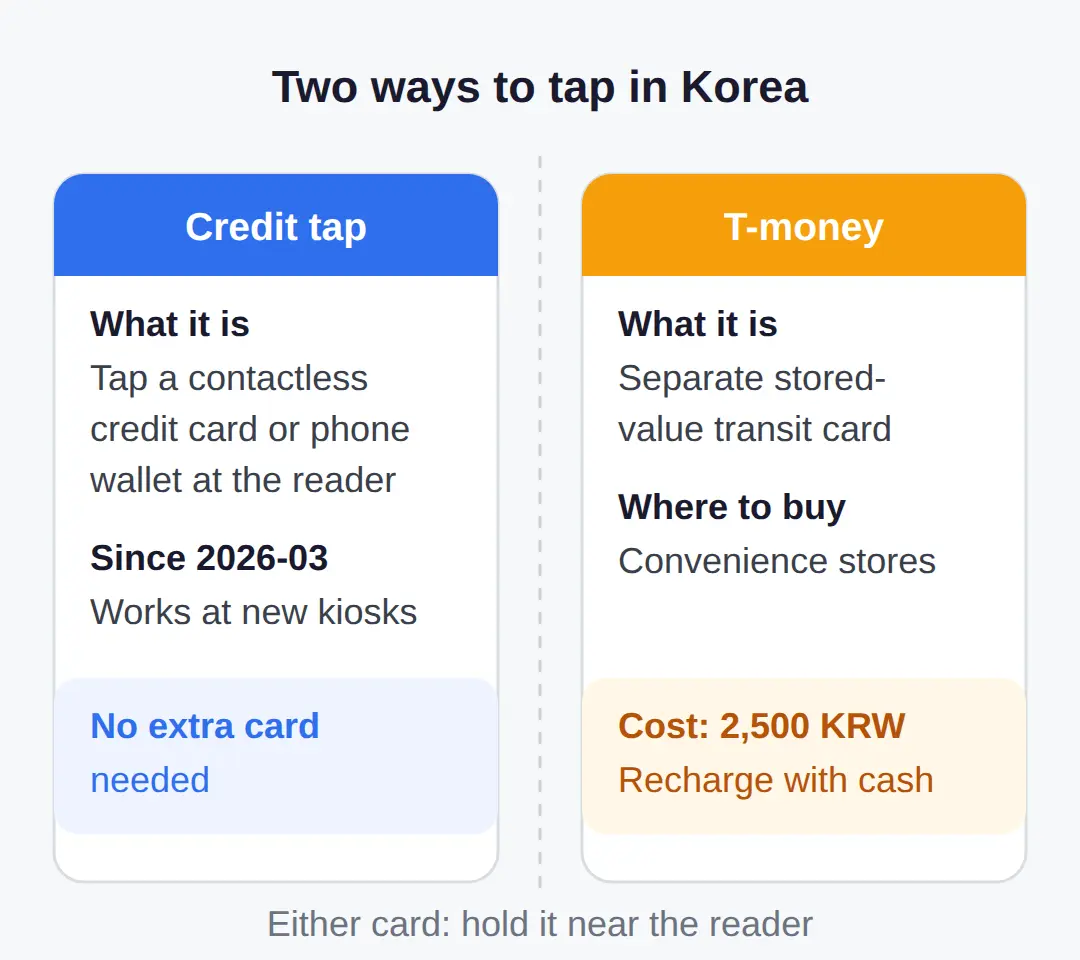
Contactless credit and debit cards, including phone wallets, can be tapped at Korean subway turnstiles and on buses the same way a T-money card is, and one recent Korea guide reports credit-card acceptance expanding at new transit kiosks starting March 2026.
The catch is at the gate: whether foreign-issued cards are accepted on subway fare gates has no recent primary-source confirmation, so a gate tap is not guaranteed for every traveler.
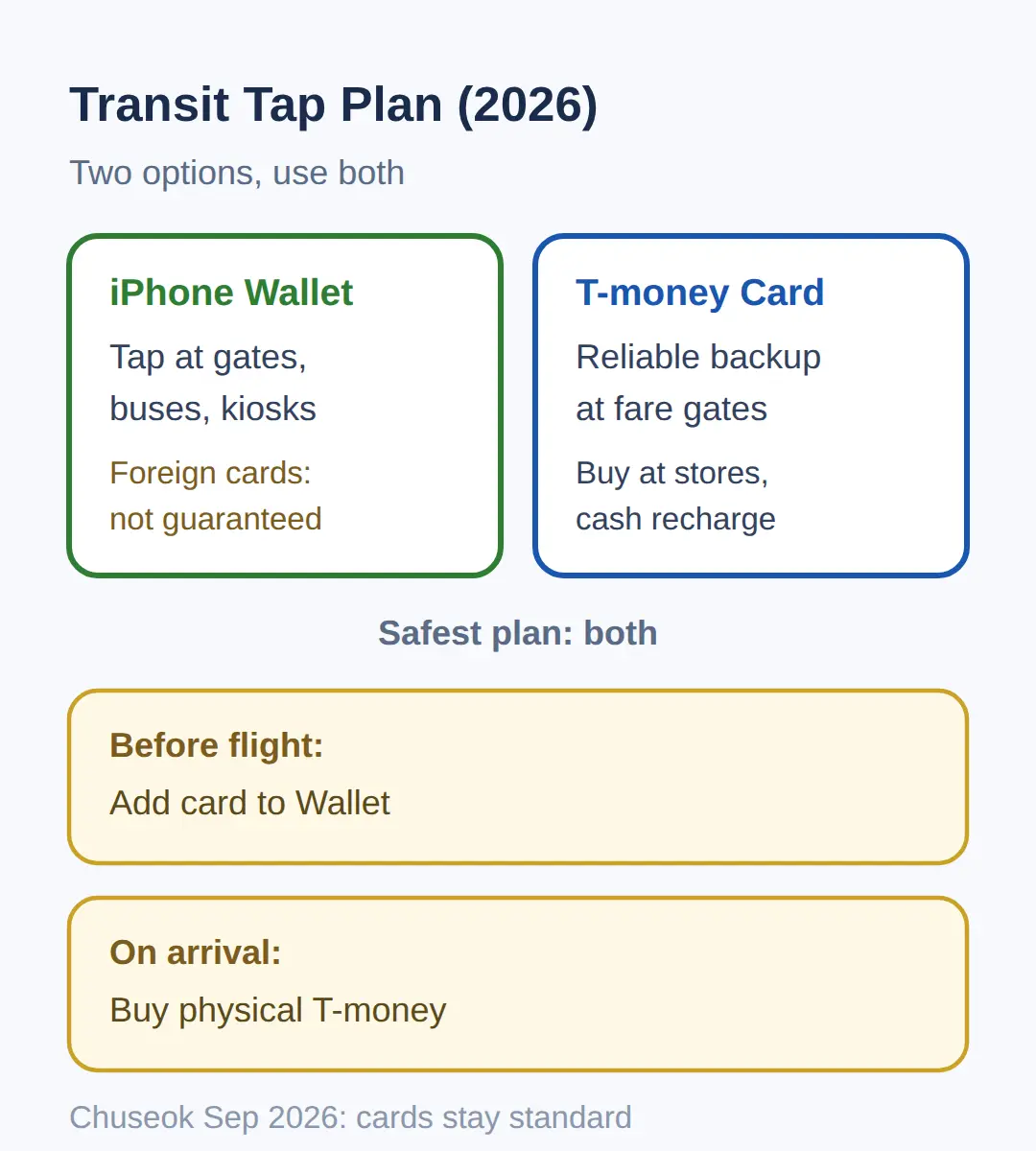
The safest plan combines both flows.
Add your card to Wallet before the trip so it is ready wherever a contactless symbol shows, and carry a physical T-money card as the fallback for fare gates.
T-money cards are sold at convenience stores and recharged with cash, which is why they remain the dependable choice for a first day in Seoul.
I would add my card to Wallet before the flight and buy the physical T-money on arrival — the physical card is the known quantity, since Korean transit-card support in Apple Wallet is not confirmed.
One more transit note for this month: Korea’s Chuseok holiday affects public transit schedules in September 2026, and contactless card payment stays the standard fare method through the holiday.
Is T-money Actually in Apple Wallet?
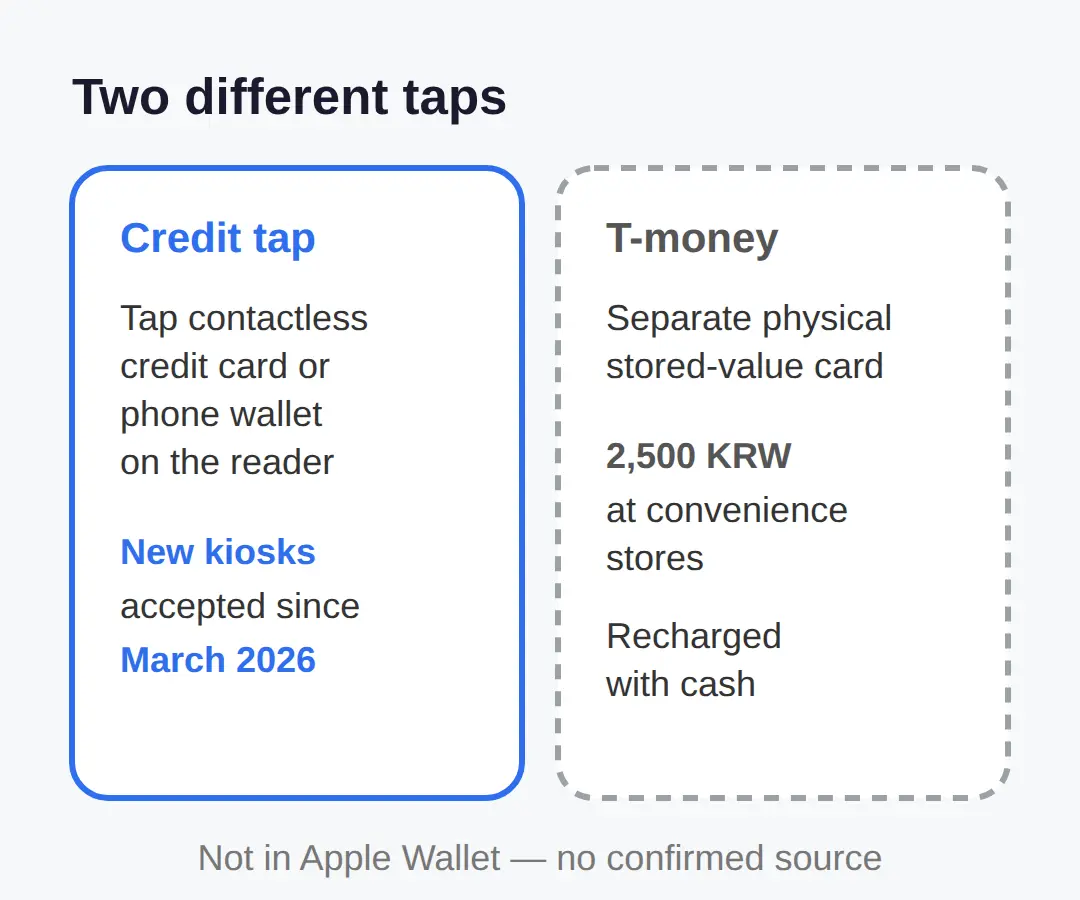
No primary source confirms that T-money can be added to Apple Wallet, so the two ‘taps’ in Korea remain different things.
One is tapping a contactless credit card or phone wallet directly on a reader, which new kiosks have reportedly accepted since March 2026.
The other is the T-money stored-value card — a separate physical card from a convenience store, recharged with cash — which is not the same flow as an Apple Pay tap.
This matters because the searches run together: ‘tap credit card on iPhone’ and ‘add T-money to Apple Wallet’ look similar but lead to different answers.
If a guide tells you T-money now lives in Apple Wallet, check the date and the source before relying on it.
The confirmed version is simpler — credit-card tap where accepted, physical T-money everywhere else.
If your trip is soon, plan around the physical card for transit and treat any phone-wallet T-money claim as something to verify, not to build your route on.
Where Apple Pay Works in Korea — and When It Fails
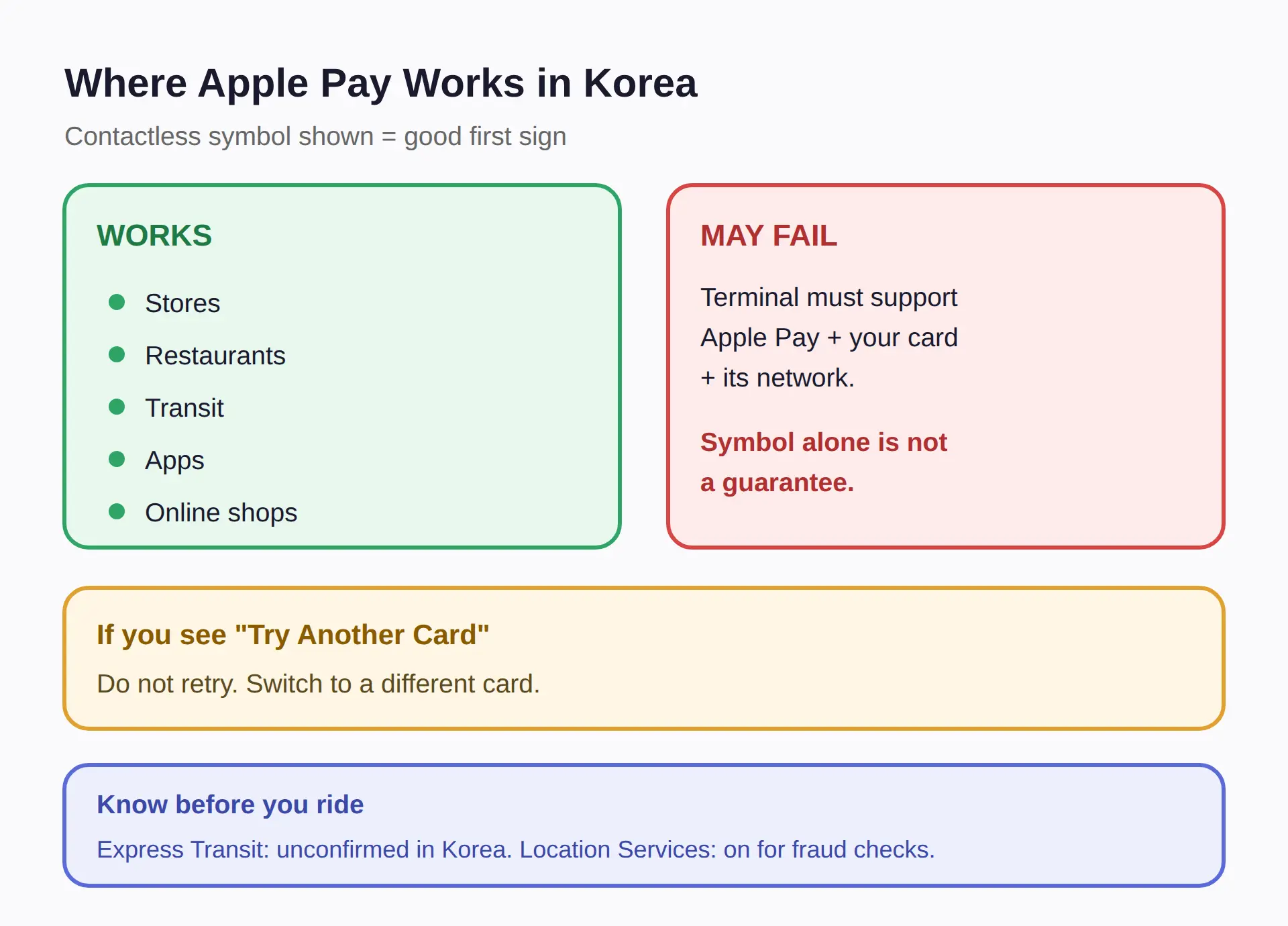
Apple Pay works at stores, restaurants, transit, apps, and online shops wherever the contactless payment symbol is shown.
The condition that trips people up: the merchant must approve not only Apple Pay but also your specific card and its payment network, so a contactless symbol alone does not guarantee every card works.
Apple Pay itself is also only available in some countries and regions, and features vary by region, so check Apple’s supported regions list before you depend on it in Korea.
When a terminal shows ‘Try Another Card’ or ‘Could Not Read Card’, it means that contactless card is not supported by that terminal’s payment service provider — switching cards is the fix, not retrying.
Two settings are worth knowing before you ride.
Express Transit mode skips Face ID, Touch ID, and confirmation at fare gates, though whether it works with Korean readers and Korean-issued cards is not confirmed.
And with Location Services on, your iPhone’s location is sent to Apple and your card issuer at payment time for fraud prevention.
Why Your Card Number Stays Private
Apple Pay never shares your actual card number with the merchant.
Each transaction uses a device account number and a unique, transaction-specific security code instead.
Payment data only moves after you approve it — with Face ID, Touch ID, or your device passcode — so nothing is transmitted without your authentication.
Under the hood, the tap itself works over NFC: near the terminal, the device sends an encrypted one-time code, the terminal routes it through the payment network, and the issuing bank verifies funds and runs fraud checks before approval returns to the reader.
For you as a traveler, this means a lost iPhone is not a lost wallet in the same way.
A stranger cannot pay without your face, finger, or passcode, and the merchant never holds a number they could leak.
If the Card Will Not Add or Will Not Read
A card that refuses to add to Wallet is usually one of two things: it is not supported in Apple Pay, or it needs your issuer’s approval first.
The issuer must be on a participating card network, so the fix starts with the bank’s own app and its ‘Add to Apple Wallet’ option.
For a physical card that will not read at a terminal, the position matters.
Align the card’s left side with the device, hold the long edge near the reader for a few seconds, and if it still fails, slowly slide the card toward the center of the device slot.
- If adding fails, check your bank’s app for an ‘Add to Apple Wallet’ button and confirm the issuer supports Apple Pay.
- If the terminal rejects the card, try a different card — the error means that provider does not support it.
- If a physical card will not read, realign it: left side to the device, long edge at the reader, then slide to center.
Before the trip, add the card two ways — manual entry in Wallet and your bank’s app — so one path is already working when you land.
Related posts
Sources
- Official Apple steps: double-click side/Home button, authent (support.apple.com)
- Add card via chip or bank app; unsupported cards need issuer (support.apple.com)
- Apple Support security guide covering merchant tokens, Expre (support.apple.com)
Summary
- Add the card in Wallet before you travel — chip, manual entry, camera scan, or your bank’s app.
- Pay with a double-click of the side button (Face ID) or Home button (Touch ID), then hold the top of the phone near the reader until ‘Done’ appears.
- For Korean transit, carry a physical T-money card as the default and use credit-card taps where new kiosks accept them.
- Before you head out, check that your card shows in Wallet and pick the right card if the default is not the one you want to tap.
- If you see ‘Try Another Card’, switch to a different card instead of retrying the same one at the terminal.
FAQ
Q. How do I tap a credit card on iPhone in Korea’s subway?
Save an eligible card in Wallet, double-click the side button, authenticate, and hold the top of the iPhone near the reader until ‘Done’ appears. Credit-card acceptance has been expanding at new Korean transit kiosks since March 2026, but foreign-card acceptance on fare gates is not confirmed, so a physical T-money card remains the safe default.
Q. Is T-money actually available in Apple Wallet for Korean transit?
No primary source confirms T-money in Apple Wallet. The confirmed option is a physical T-money card from a convenience store, recharged with cash.
Q. Can I use Apple Pay at stores and restaurants in Korea?
Yes, wherever the contactless payment symbol is shown — but the merchant must also approve your specific card and payment network, so a symbol alone does not guarantee every card works.
Q. Why does my card show ‘Try Another Card’ on a Korean terminal?
That error means the contactless card is not supported by that terminal’s payment service provider. Try a different card.
Q. Does Apple Pay share my card number when I tap?
No. Each tap uses a device account number and a one-time security code, and payment data only transmits after Face ID, Touch ID, or your passcode.
Korea’s Chuseok holiday shifts transit schedules in September 2026 — note those dates before you plan a day trip.
Cover photo: AI-generated illustration (contactless payment iphone) — AI-generated image, illustrative only
#ApplePayKorea #T-money #Koreasubway #iPhonepayment #Koreatravel2026 #contactlesspayment
📅Upcoming Dates — 이번 주 32 · D-day Chuseok holiday period — rice cake interest peaks전체 보기 →