A Korea Bizwire report on September 7, 2026 put a number on something most travelers learn the hard way: picking the wrong eSIM for the same trip can cost up to 33% more.
The gap is not between brands.
It comes from where the plan is bought and how long it lasts.
This post compares the four options with real prices, explains what a data-only eSIM cannot do, and ends with a setup checklist to finish before the flight.
Korea eSIM travel tips: four ways to get data, and what each really costs
| Travel eSIM | ₩7,000–13,000 for 5 days · unlimited ₩16,000 (3 days) to ₩93,000 (30 days) |
|---|---|
| Airport carrier SIM (KT/SKT/LG U+) | About ₩71,500 for 30-day unlimited · only option with a Korean 010 number |
| Pocket wifi | ₩3,000–6,000 per day · shared by 3–4 people |
| Home-carrier roaming | $7–15 per day for 0.5–1GB, then throttled |
For the same trip, four options sit side by side: a travel eSIM, an airport carrier SIM, pocket wifi, and roaming on the home carrier.
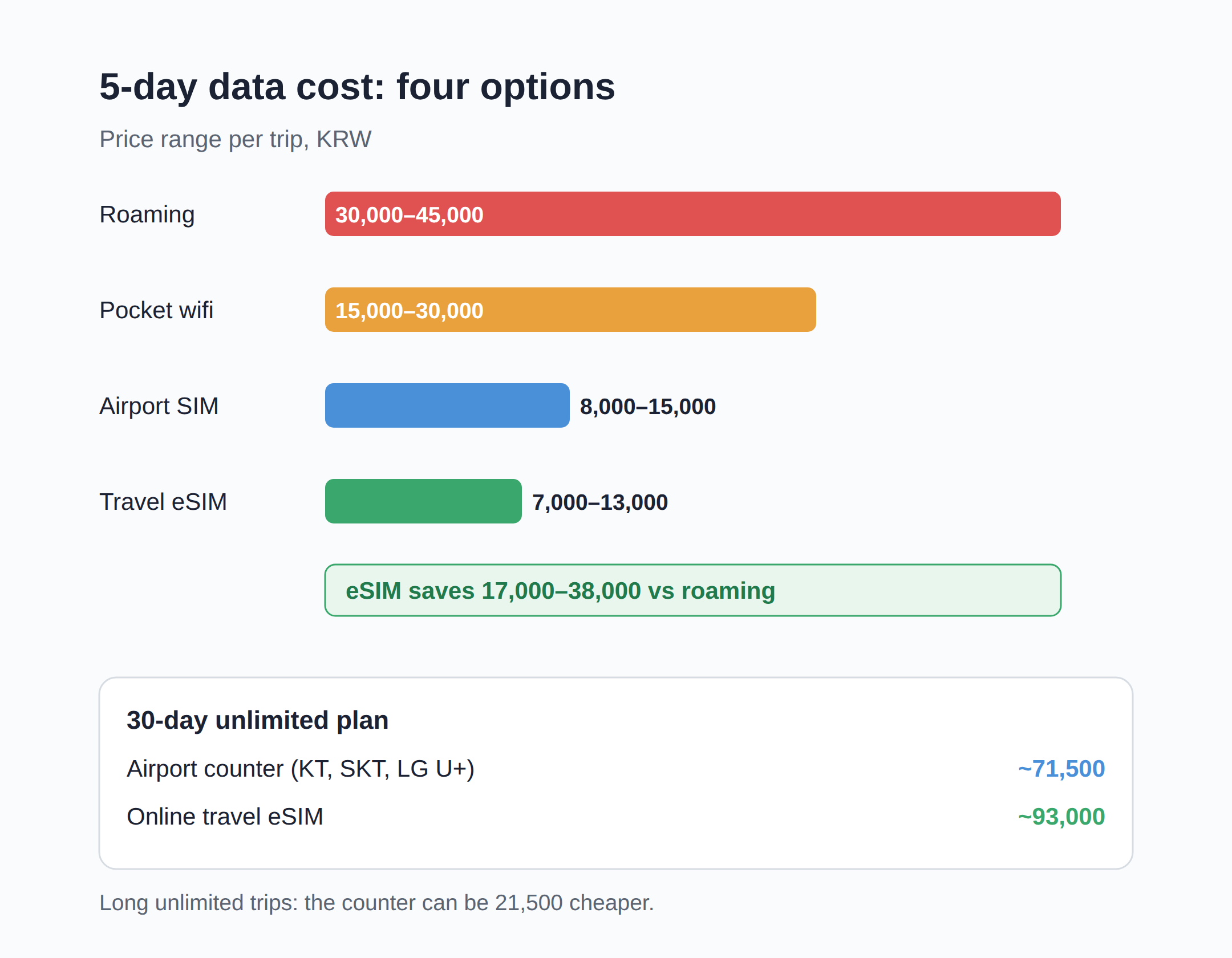
On a 5-day comparison, carrier roaming runs ₩30,000–45,000, a local physical SIM ₩8,000–15,000, an eSIM ₩7,000–13,000, and pocket wifi ₩15,000–30,000.
Over five days, switching from roaming to an eSIM saves roughly ₩17,000–38,000 — well over half the bill.
For 30 days of unlimited data, airport carrier counters (KT, SK Telecom, LG U+) converge on about ₩71,500, while an online travel eSIM runs about ₩93,000.
So the airport counter is not always the expensive one: for long unlimited trips it can undercut the travel eSIM by ₩21,500.
The 33% saving in the September 7 report comes from these kinds of channel and duration comparisons.
Travel eSIMs start much lower too — small fixed-data plans begin around ₩5,000, which suits a short city trip.
What decides the bill: days, data size, and the fair-use cap
Three things move the price: how many days, how much data, and whether the plan is truly unlimited.
Short trips favor per-day math.
A 3-day unlimited travel eSIM costs about ₩16,000, which is roughly ₩5,300 per day.
Long trips favor the opposite: 30 days of unlimited on a travel eSIM is about ₩93,000, more than the ₩71,500 airport counter SIM.
Groups change the math again.
Pocket wifi at ₩3,000–6,000 per day split among four people is about ₩750–1,500 per person per day.
One warning about ‘unlimited’: most travel eSIMs carry a fair-use clause.
Airalo’s Korea unlimited, for example, runs full speed up to about 3GB per day, then throttles until the next-day reset.
That cap is fine for maps, translation, and photos, and it is not enough for streaming — hotel wifi in Korea is generally excellent, so leave Netflix there.
Daily roaming plans from home carriers charge $7–15 for a small high-speed allowance of 0.5–1GB, then drop to about 256kbps, so heavy use dies quickly anyway.
Navigation and translation apps use surprisingly little data; streaming, video calls, and laptop tethering are what burn it.
Do you need a Korean 010 number?
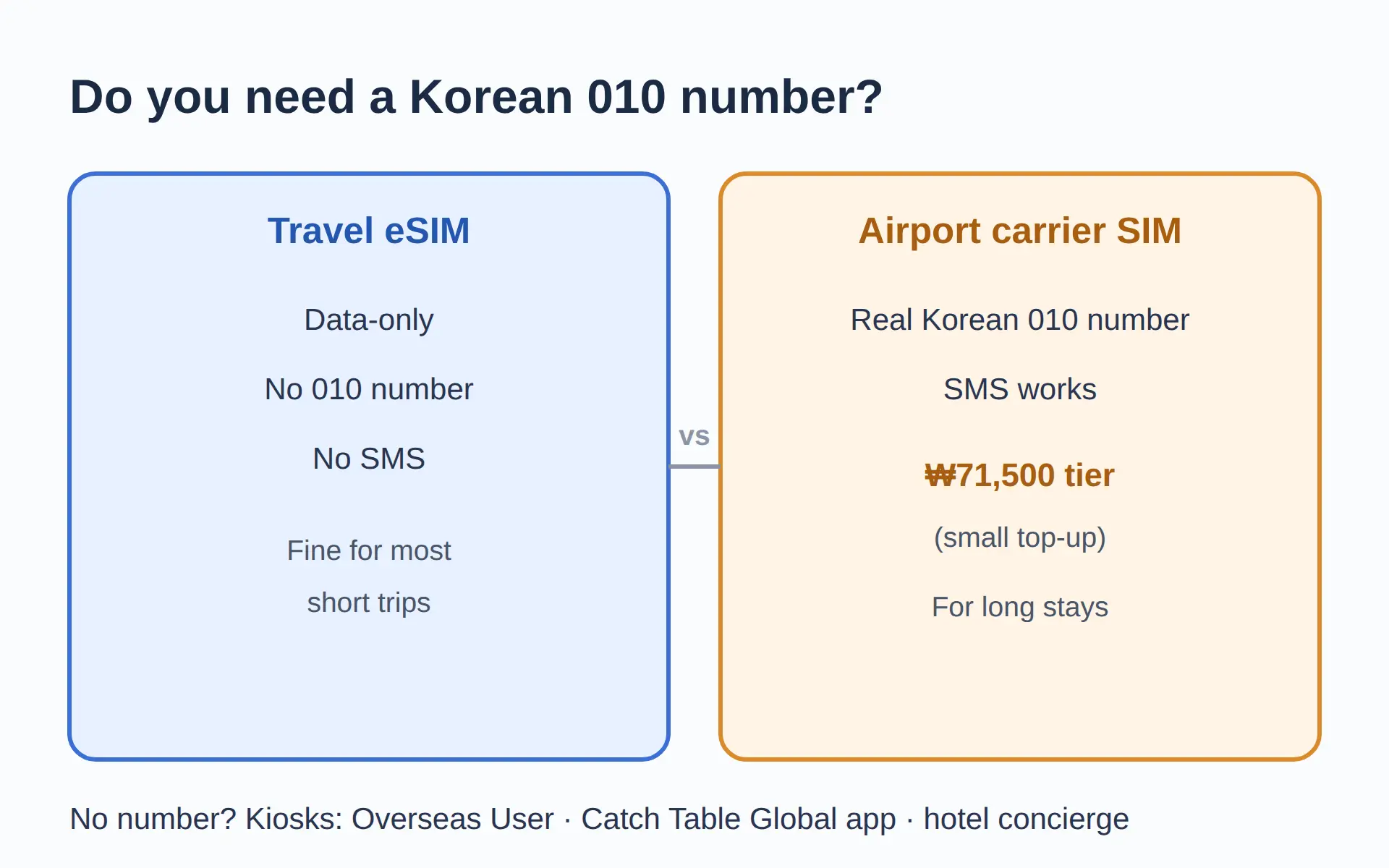
Travel eSIMs are data-only: no Korean 010 number and no SMS.
Only an airport carrier SIM gives a real Korean number, usually with a small top-up at the counter, and that is the ₩71,500 tier.
Most short-stay travelers never need one, because the few places that ask for a number have workarounds.
Waiting-list kiosks at popular restaurants increasingly offer an ‘Overseas User’ option, and the Catch Table Global app accepts foreign accounts and foreign cards.
Hotel concierges can also book famous restaurants on request.
Anyone staying long enough to genuinely need a local number should just take the airport carrier SIM and pay the difference.
Setup before departure: install at home, activate on landing
Everything except activation should happen at home on wifi.
First, check the phone.
Dial *#06# — if an EID number appears next to the IMEI, eSIM works; iPhone also shows it under Settings > General > About, and Galaxy under Settings > Connections > SIM manager.
eSIM runs on iPhone XS/XR (2018) and later, Galaxy S20 series and later including Note 20 and Z Flip/Fold, and Pixel 3 and later, and the phone must be carrier-unlocked.
Mainland-China iPhone models lack eSIM hardware, so check the actual device rather than the model series name.
Next, buy the plan a few days early and install the profile by scanning the QR code — installing does not start the clock, because most Korea plans begin counting only on first connection to a Korean network.
Label the two lines ‘Home’ and ‘Korea’, keep the home SIM on for bank verification SMS, and turn data roaming OFF on the home line.
After landing, set the Korea eSIM as the data line and turn data roaming ON for that line.
It feels wrong, but most travel eSIMs require it.
Wait about a minute, and the phone is on a Korean network before leaving the arrivals hall.
That dual-SIM setup is also the reason an eSIM beats roaming for most people: the home number keeps receiving SMS free while data runs on cheap local rates.
Where the data actually goes: maps, taxis, trains
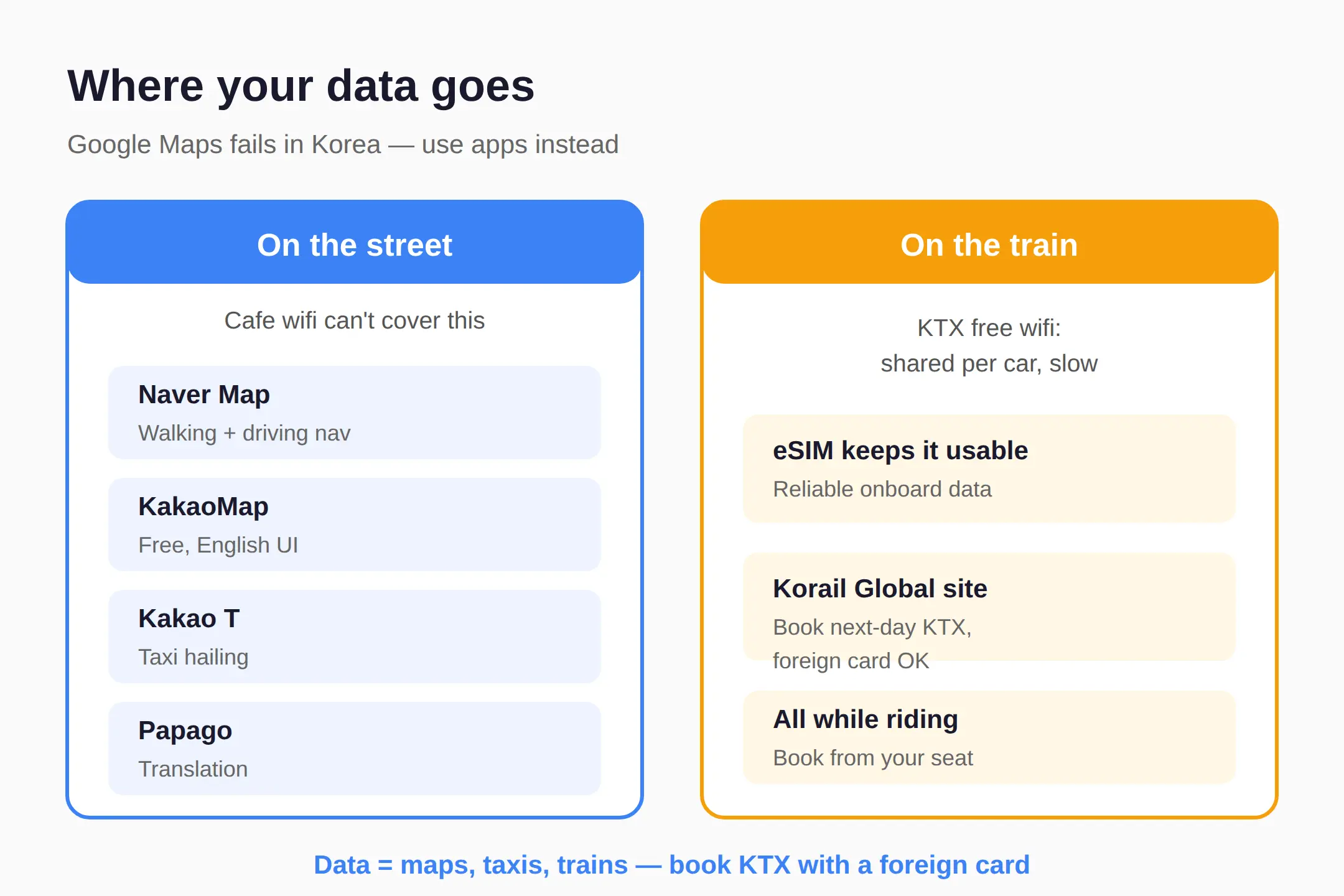
Korea is the one country where Google Maps fails.
Korean law restricts high-precision map data, so Google offers no driving navigation and unreliable walking directions.
Naver Map and KakaoMap replace it — free, English UI, no Korean number needed — but they only help with internet on the street, which cafe wifi cannot provide.
Kakao T handles taxis, Papago handles translation, and trains run on data too.
KTX has free onboard wifi, but it is shared per car and slow, so an eSIM keeps the train ride usable.
With data, next-day KTX seats can be booked on the Korail Global site with a foreign card while riding.
Which option for which trip
Two to three days with a cheap daily pass: home-carrier roaming can still win, and nothing needs setting up.
Up to a week, one phone, maps and translation only: a small fixed-data travel eSIM from about ₩5,000 is the cheapest path.
One to four weeks, heavy use: unlimited travel eSIM up to 3 days is cheap, but for 30 days the ₩71,500 airport counter SIM undercuts the ₩93,000 eSIM.
Group of 3–4 with one hub device: pocket wifi at ₩750–1,500 per person per day.
Long stay needing a local number: airport carrier SIM, and the number comes with it.
The prices here are 2026 figures in ₩; unlimited travel eSIM plans are billed in dollars, so the ₩ amounts move with the exchange rate — re-check at purchase.
👉 Korea travel guide 2026 checklist
👉 installing does not start the clock
Related posts
📎 Seoul — everything we know
📎 📅 Upcoming Dates — Release & Event Calendar
Sources
- Trigger report itself (already in brief); no second outlet f (koreabizwire.com)
- Not found within 6-month window (koreabytrain.com)
- starters.co.kr 5-day cost table and dual-SIM setup steps (starters.co.kr)
Before you fly: the 6-step checklist
- Dial *#06# to confirm the phone has an EID.
- Buy the eSIM a few days before departure.
- Install the QR profile at home on wifi — installation is not activation.
- Label the lines ‘Home’ and ‘Korea’.
- Home SIM: line ON, data roaming OFF. Korea eSIM: set as data line, roaming ON after landing.
FAQ
Q. What is the cheapest way to get data in Korea?
For 5 days, an eSIM at ₩7,000–13,000 beats roaming (₩30,000–45,000), a local physical SIM (₩8,000–15,000), and pocket wifi (₩15,000–30,000).
Q. Is eSIM cheaper than buying a SIM at the airport?
It depends on length. A 3-day unlimited eSIM is about ₩16,000, but for 30 days unlimited the airport carrier counter at about ₩71,500 is cheaper than the ₩93,000 travel eSIM.
Q. How do I check if my phone supports eSIM?
Dial *#06#. If an EID appears next to the IMEI, the phone supports eSIM. iPhone XS/XR and later, Galaxy S20 and later, and Pixel 3 and later qualify, and the phone must be carrier-unlocked.
Q. Will installing the eSIM before my trip use up the plan?
Usually not. Most Korea travel eSIMs start the validity clock on first connection to a Korean network, but check the plan’s own terms.
Compare all four options before you fly — the right pick for your trip length can cut the bill by up to 33%.
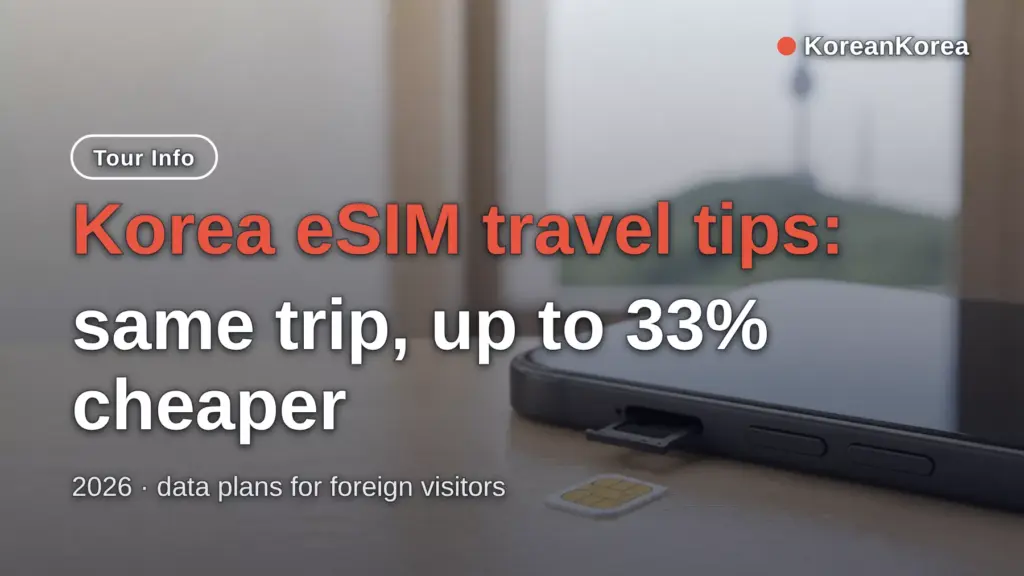
Cover photo: AI-generated illustration (smartphone sim card) — AI-generated image, illustrative only
#KoreaeSIM #Koreatraveltips #Koreapocketwifi #Korearoaming #NaverMap #KakaoT #Seoultravelprep #KTXbooking
📅Upcoming Schedule — this week 1 · D-7 Godsoi lineup removed from menus after 2026-11-09See all →Last updated 2026-10-06. Editorial policy