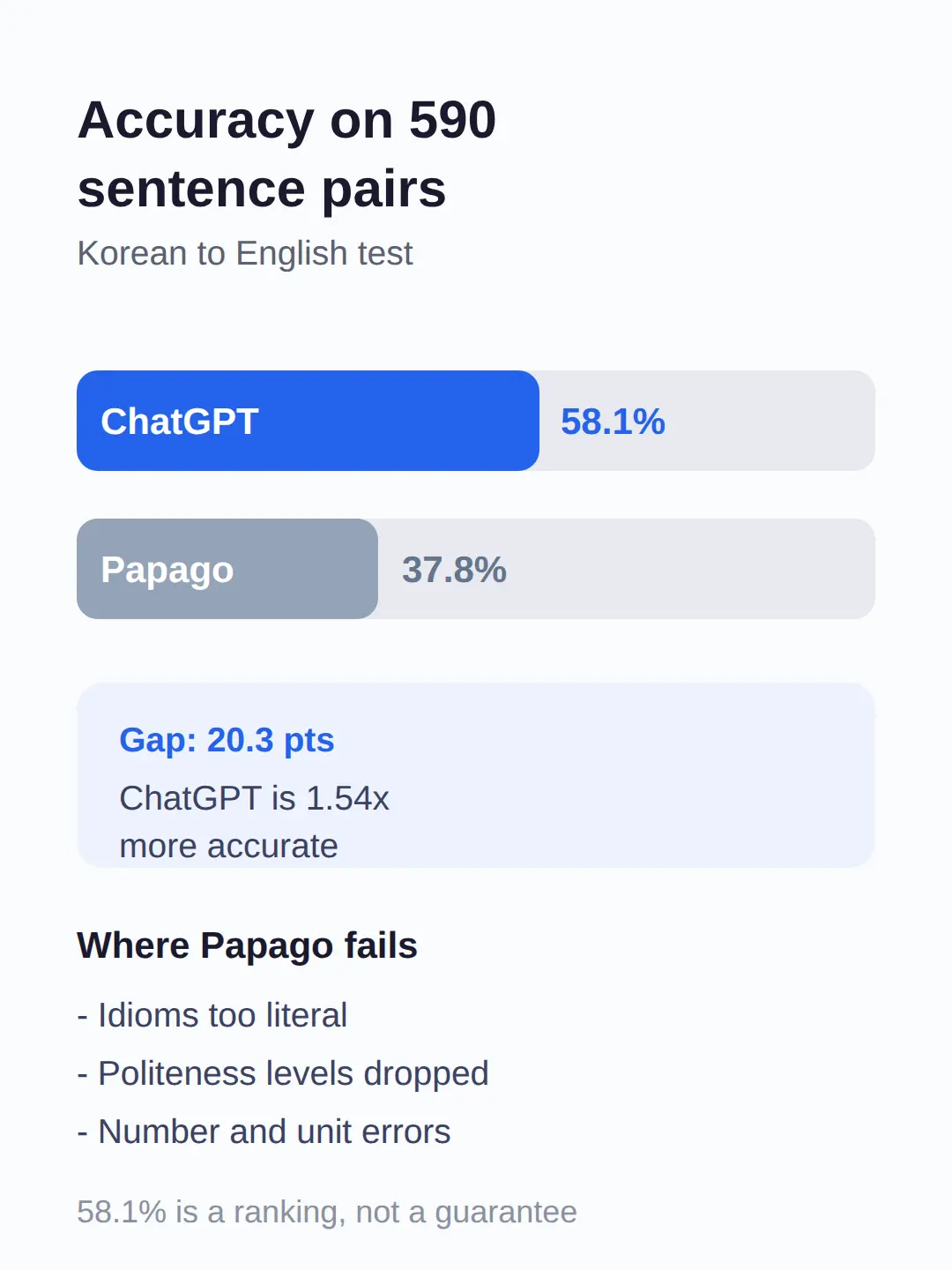
ChatGPT translated 58.1% of 590 Korean-to-English sentence pairs correctly, against 37.8% for Papago, in the largest published comparison of the two.
For a traveller, accuracy is only one factor — Papago and Google Translate are the only major apps that work without internet, and both are free.
This post compares the main options for travellers — Papago, ChatGPT, Google Translate and Apple’s built-in iPhone Translate — on accuracy, offline use, camera translation, voice mode and price, and ends with which one to download for your situation.
Best Korean Translation App for Accuracy: ChatGPT vs Papago
| Papago | 37.8% (590-sentence Korean→English study, published September 2025) |
|---|---|
| ChatGPT (free tier) | 58.1% (same study); works only online |
| Google Translate | Not in the study; 240+ languages, free, offline packs, live camera translation |
| ChatGPT Plus | $20/month ($240/year); same online-only limit, adds paid model limits |
| Apple Translate (built-in) | Korean supported; offline after downloading the language pack; camera input |
ChatGPT is the most accurate Korean-to-English option tested so far, scoring 58.1% on 590 sentence pairs while Papago scored 37.8%.
The gap is 20.3 percentage points, so ChatGPT was roughly 1.54 times as accurate as Papago in the same test (58.1 ÷ 37.8 ≈ 1.54).
The study also sorted the errors, and Papago’s losses came largely from literal rendering of idioms, dropped levels of politeness, and number-and-unit mistakes — exactly the things that make a sentence sound wrong to a native speaker.
ChatGPT’s advantage showed up most on full sentences with context, which is what translators like Papago handle worst.
One caution before you trust the number blindly: the study does not state which ChatGPT model version was tested, so treat 58.1% as a ranking, not a guarantee for the version on your phone today.
Even at 58.1%, more than four in ten sentences came out imperfect, so for anything with real consequences — a hospital, a contract, a complaint — get a human to check.
For restaurant orders and small talk, a 58%-accurate draft is usually enough to be understood.
Papago vs Google Translate: Which Works Offline?
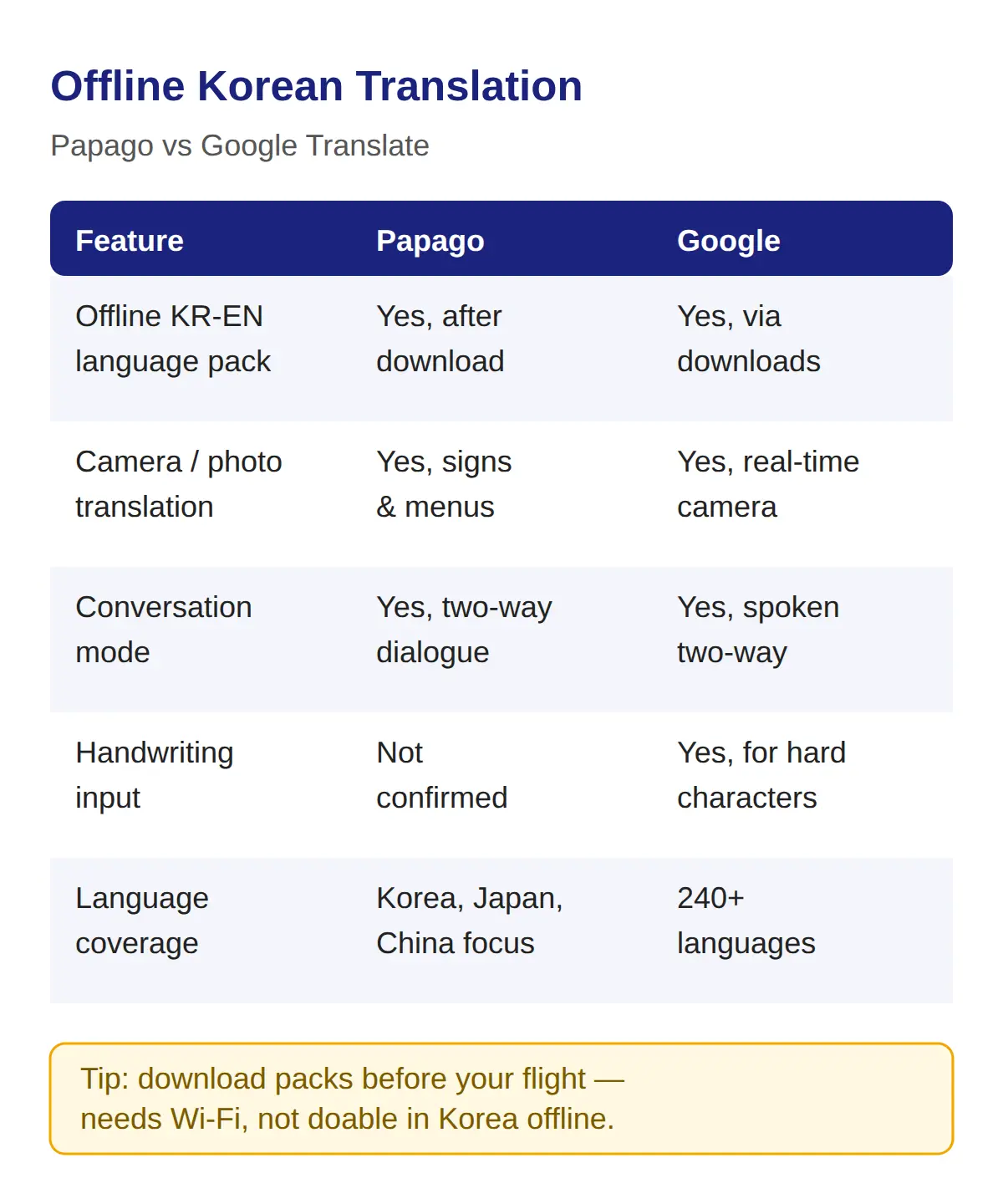
Papago and Google Translate are the only major apps that translate Korean without internet, once you download their Korean language packs.
| Feature | Papago | Google Translate |
|---|---|---|
| Offline Korean-English pack | Yes, after downloading a language pack | Yes, with downloadable language packs |
| Camera/photo translation | Yes, for Korean signs and menus | Yes, real-time via the phone camera |
| Conversation mode | Yes, two-way Korean-English dialogue | Yes, for spoken two-way dialogue |
| Handwriting input | Not confirmed | Yes, for characters you cannot type |
| Language coverage | Korea/Japan/China-focused | Over 240 languages, the widest of any translator app |
Neither app’s offline pack is confirmed to include camera translation offline, so check the downloaded-pack features on your own phone before you rely on it in a basement subway station.
Download the packs before your flight — that is the one setup step you cannot do without Wi-Fi in Korea.
If you will spend time outside Seoul with weak signal, offline support should outrank accuracy in your choice.
Does ChatGPT Work for Korean Translation?
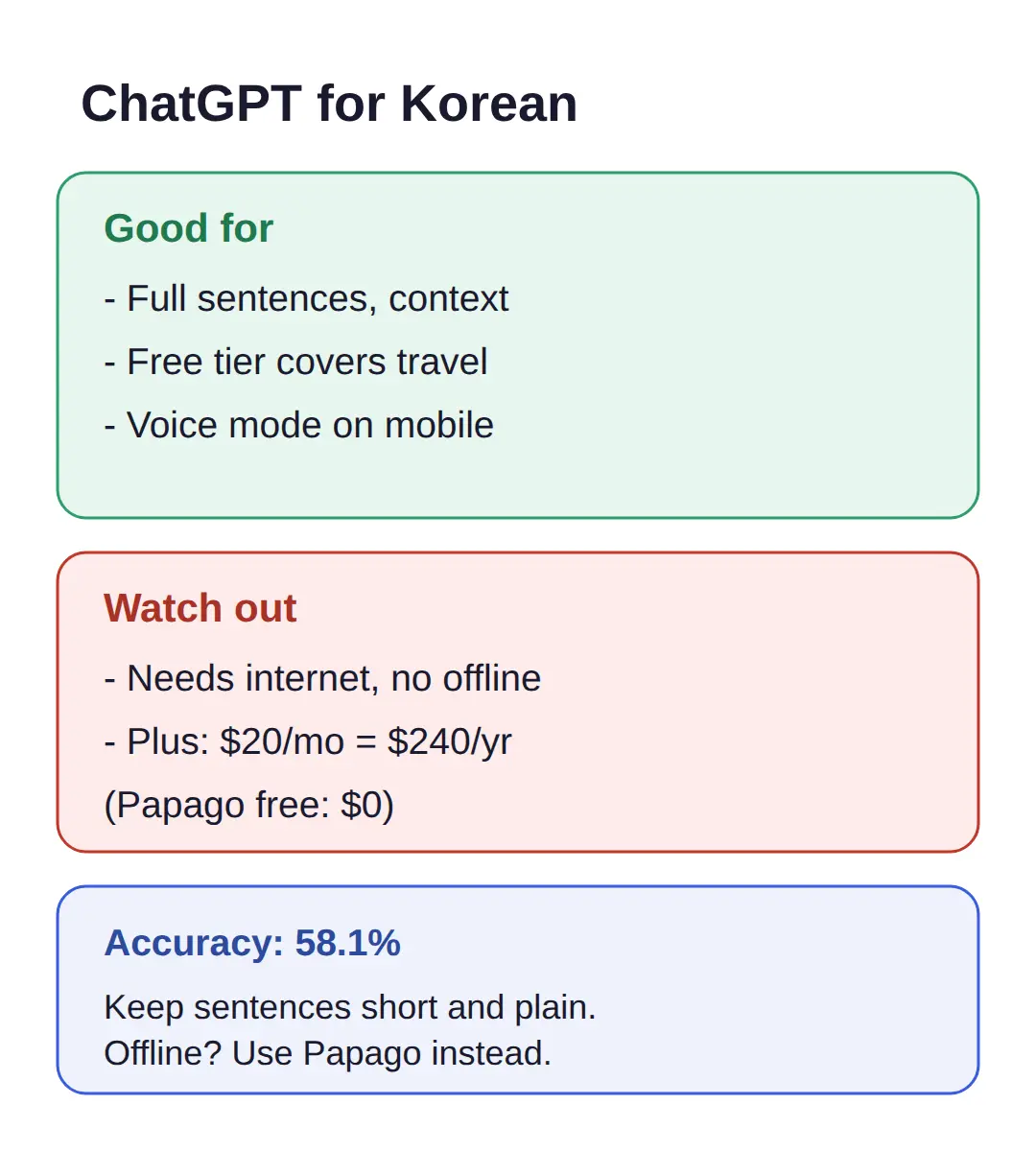
ChatGPT handles Korean-to-English translation well on full sentences and context, and the free tier is enough for travel use — you only pay $20 a month if you want the paid tier.
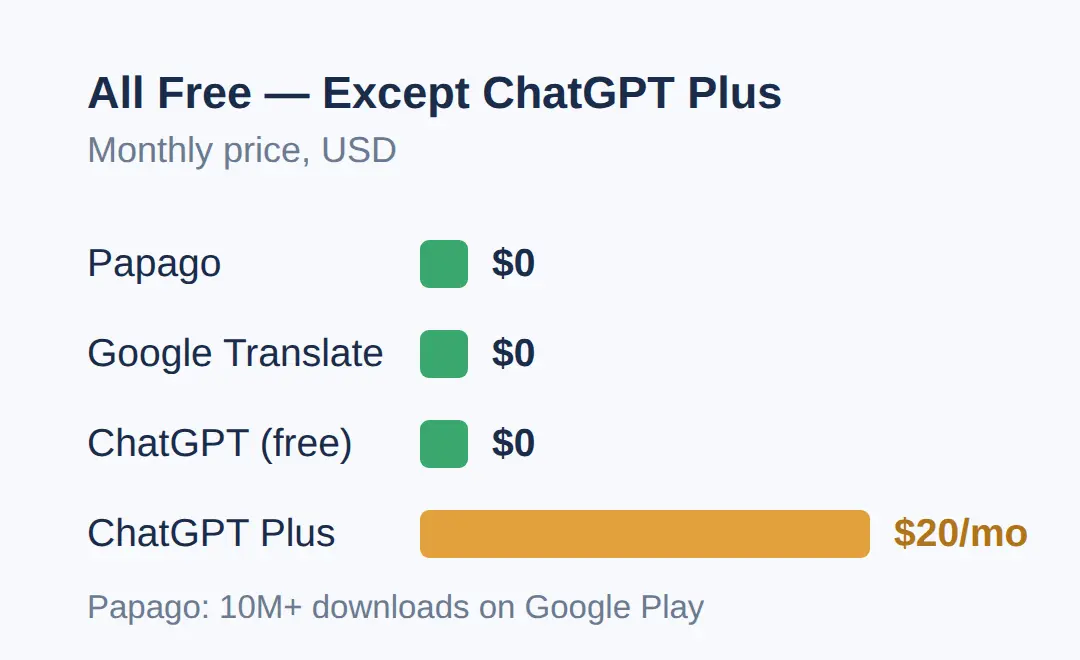
ChatGPT Plus costs $20 per month, which is $240 a year more than the free Papago app, and the free tier already covers typical translation tasks.
The mobile app includes a voice conversation mode you can use as a spoken translator.
The catch is connectivity: ChatGPT needs an internet connection, with no offline Korean translation available.
If accuracy matters and you have signal — typing a question for your hotel, translating a message — open ChatGPT first.
If you are offline, fall back to Papago or Google Translate.
Since it is 58.1% accurate rather than perfect, ask it to keep sentences short and plain when you translate into Korean, because simple output leaves less room for error.
What About Apple Translate and Other Apps?
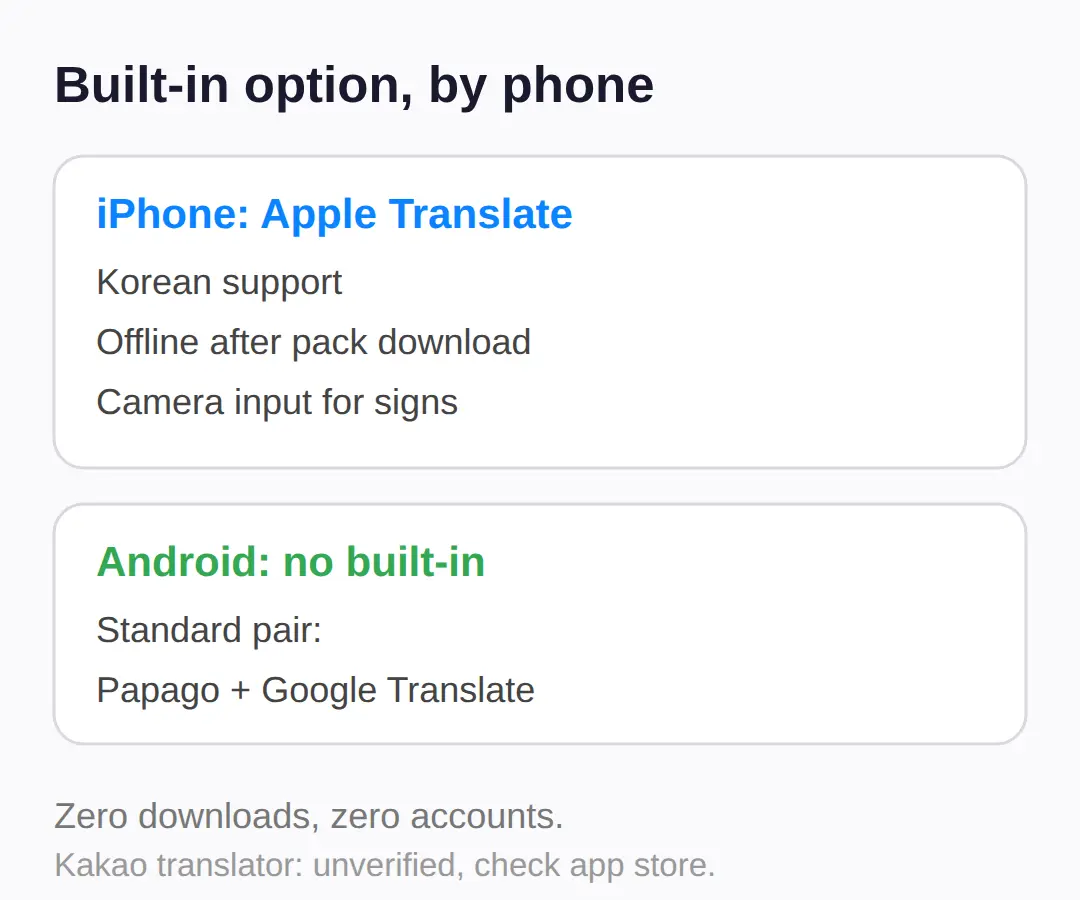
If you carry an iPhone, the built-in Apple Translate app already does the essentials for Korean: it supports Korean, works offline after you download the language pack, and offers camera input for signs and menus.
That makes it the zero-download option — no extra app, no storage, no signup.
Other Korean-local apps such as Kakao’s translator exist, but their current standalone availability and feature set could not be verified this run, so check your app store before counting on them.
If your phone storage is tight or you want one less account, start with Apple Translate and add Papago only if you need a second opinion.
For Android users there is no equivalent built-in app, so Papago plus Google Translate is the standard pairing.
Treat any app beyond these as a bonus rather than a plan.
Which One Should You Actually Download?
Download Papago and Google Translate for offline and camera use, and use ChatGPT when you have signal and need the most accurate full-sentence translation.
The decision comes down to your situation, and it is the same set of factors the research identifies: accuracy, offline support, voice mode, image translation and price.
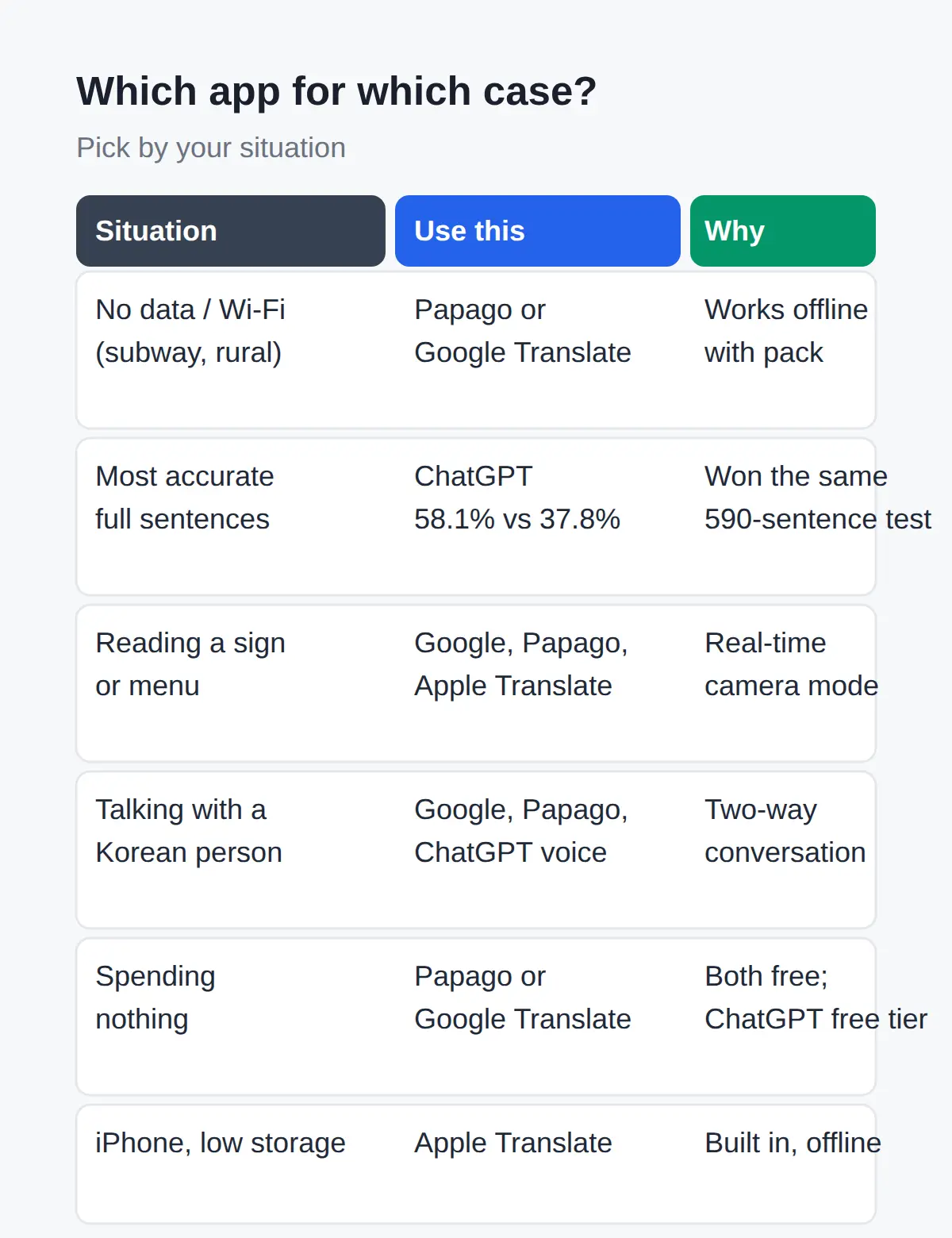
Use the table below to find your case.
| Your situation | Use this | Why |
|---|---|---|
| No data or Wi-Fi (subway, rural areas) | Papago or Google Translate | The only two that work offline with a downloaded Korean pack |
| Most accurate full-sentence translation | ChatGPT | 58.1% vs Papago’s 37.8% on the same 590-sentence test |
| Reading a sign or menu by camera | Google Translate, Papago, or Apple Translate | All three offer real-time camera translation |
| Talking with a Korean person | Google Translate, Papago, or ChatGPT voice mode | All three have two-way conversation or voice modes |
| Not wanting to spend anything | Papago or Google Translate | Both completely free; ChatGPT’s free tier also works |
| iPhone with little storage | Apple Translate | Built in, Korean supported, offline pack and camera input |
If I were packing for a trip to Korea, I would install Papago as the offline backup and keep ChatGPT as my first stop for anything I type out slowly — accuracy first when I can, coverage first when I cannot.
Quick Answers
Papago and Google Translate are both free to use.
Papago runs on iOS, Android, and as a free web translator at papago.naver.com, and it is built by Naver, Korea’s largest search company, which focuses it on Korean, Japanese and Chinese.
Google Translate is free with no account required.
For pricing, that closes the loop: Papago $0, Google Translate $0, ChatGPT free tier $0, ChatGPT Plus $20 per month.
If you want the app Koreans actually use, Papago is the local default — it’s built by Naver, Korea’s largest search company, with a Korea/Japan/China-focused design.
If you want the widest language coverage for a multi-country trip, Google Translate’s 240+ languages wins.
Either way, both cost nothing, so the real cost of trying both is one download each.
Related posts
📎 📅 Upcoming Dates — Release & Event Calendar
Sources
- 590-pair study, ChatGPT 58.1% vs Papago 37.8% correct (accesson.kr)
- Papago official page; free translator focused on Korean/Asia (papago.naver.com)
- Offline packs and real-time camera translation supported (translate.google.com)
The Short Version
- Most accurate Korean-to-English: ChatGPT, 58.1% vs Papago’s 37.8% on 590 sentence pairs — about 1.54x.
- Only Papago and Google Translate work offline; download their Korean packs before you fly.
- Free options: Papago, Google Translate, ChatGPT free tier — ChatGPT Plus is $20/month ($240/year) and adds no offline mode.
- Camera translation: Google Translate, Papago, or the built-in Apple Translate app.
- A 58%-accurate translation is fine for menus and directions; get a human for anything medical, legal or financial.
FAQ
Q. Which app is most accurate for Korean to English translation?
ChatGPT, at 58.1% accuracy on 590 Korean-to-English sentence pairs, versus 37.8% for Papago in the same study. The study does not name the ChatGPT model version tested, so read it as a ranking rather than a promise.
Q. Does Papago work offline in Korea?
Yes, after you download the Korean language pack — but the same pack download is needed, and whether the offline pack covers image translation has not been confirmed, so check your app before relying on it offline.
Q. Is Google Translate good for Korean menus?
It is one of the best options for menus: its camera mode translates Korean text in real time, it is free with no account, and the Korean language pack works offline.
Q. Is ChatGPT good at Korean translation?
Yes for full sentences and context — it outscored Papago 58.1% to 37.8% in a 590-pair test — but it needs internet, and the free tier is enough for travel use.
Q. Is Papago accurate for Korean to English?
It is serviceable but clearly behind ChatGPT in the only head-to-head study: 37.8% of 590 sentences translated correctly, with most errors in idioms, politeness levels, and numbers.
No dates to watch here — this is an evergreen comparison. Update your offline language packs before your next trip and the rest holds.
Cover photo: Google Camera Translate es Emazing (17131947549) by cogdogblog — CC BY 2.0
#koreantranslationapp #papago #chatgptkorean #googletranslatekorea #travelappskorea
📅Upcoming Schedule — this week 1 · D-7 Godsoi lineup removed from menus after 2026-11-09See all →Last updated 2026-10-05. Editorial policy